


With the launch of its On Demand resource page, the Legal Tech Institute at Harris County Law Library is continuing to grow. A collection of educational resources, including recorded CLE presentations and quick-reference screencasts, is available with the click of your mouse. The first LTI CLE, Social Media for Lawyers, was held in late October. If you missed it, please see our On Demand learning library to view the recording. You can then submit the CLE course number to earn one free hour of CLE credit, including .25 ethics credits. Visit the page again to view future recordings of our CLE events, or come see us at the Law Library and attend the programs in person. All are welcome and there is always more content on the way.
Master Microsoft Word at the Harris County Law Library's Legal Tech Institute


The Legal Tech Institute at Harris County Law Library is offering a free CLE program this Thursday, November 17th, at 12:00 pm. Join us as we present Microsoft Word for Lawyers and Other Law Types, and ramp up your productivity in just one hour. Learn time-saving tips for drafting legal documents more efficiently. Automate routine tasks, and eliminate the frustration of using Word in your daily practice. Become a Microsoft Word power user!
This practical, skills-based presentation will be customized for the needs of today's legal professionals and is guaranteed to make your work easier. Please join us! For details and to register for this course, please visit the Legal Tech Institute Events page.
Announcing the Legal Tech Institute @ Harris County Law Library


The Harris County Law Library is excited to announce the launch of our Legal Tech Institute, a collection of free learning opportunities focused on the tech that you need to work more efficiently. A new learning session will be offered every month, with content designed for a diverse audience of legal tech beginners and experts. For details, visit the LTI webpage.
On the LTI webpage, you'll find links to affordable practice management solutions; organizations, networks, and institutes for innovation; and legal media outlets where podcasts and blogs on the latest in legal technology are featured. You'll also have access to legal news via our archived collection of Tech Tuesday blog posts. The LTI Course Catalog contains our upcoming legal tech programs, including a seminar in November on Microsoft Word for Lawyers, and another in December on Blending Your Legal Research. December will also feature a Vendor Talk on Lexis Advance.
We'll be adding more content to the LTI page as the Institute develops, including short video tutorials on basic tech tasks such as converting a Word document to a PDF, inserting tables of contents, and using the Find and Replace feature as well as other tips and tricks for creating and managing your documents more efficiently.
If you have any ideas for content that you'd like to see included on the LTI page or added to the Course Catalog for a future LTI program, please let us know. We look forward to hearing from you and seeing you in attendance at our upcoming programs!
Immigration Law Resource Month

In October, we at the Harris County Law Library are continuing to highlight our collection of immigration law resources. Throughout the month, we will feature materials, in the library an online, to assist you in conducting research and learning about immigration law in the United States.
Several new immigration law resources are now on our shelves, including the 15th edition of Kurzban's Immigration Law Sourcebook, and the 17th edition of U.S. Immigration Made Easy, published by Nolo Press. On Westlaw, you can access the latest immigration news and analysis, as well as immigration law treatises, and official immigration forms. Lexis provides additional access to popular immigration titles, including Benders Immigration Law Bulletin and Benders Immigration Case Reporter. Both Westlaw and Lexis can be accessed on our computers in the Law Library.
These titles are just a few of the immigration law items in our collection. Additional resources will be featured throughout the month in the Law Library and on our blog.
Using Google's Verbatim Search to Customize and Refine Your Search Queries

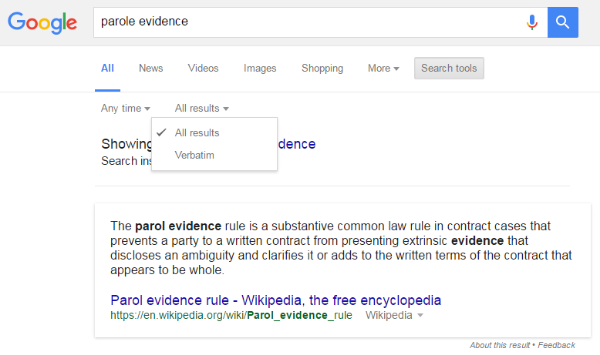
Last week’s Tech Tip presented strategies for structuring more effective Google search queries. This week, we revisit Google to focus on another useful feature, a small but powerful tool for clarifying and refining your searches.
The feature, known as Verbatim Search, allows you to more precisely customize your search queries and override Google’s “Did you mean” feature. Here’s how it works: Suppose you’re conducting research on the trademark for a cleverly-named product line, a variety of tea-related beverages with names such as HonesTea, RealiTea, IngenuiTea. When you search for HonestTea, for example, Google asks, “Did you mean Honest Tea?” and restructures your search query as two separate words. This assumption can cause frustration, but, more importantly, it yields inaccurate search results.
Fortunately, this problem is easily corrected. By using the Verbatim Search feature, you can override Google’s default settings. Simply go to the Google search page. Under the Google search box, click on Search Tools. Then, click on All Results to expand the drop-down menu, revealing the Verbatim Search feature. Select this option. Google will repeat the search, giving you a more precise set of search results that accurately capture the intended meaning of your search terms.
As another example (pictured above), try searching the terms parole evidence in the default Google search box. Automatically, Google reinterprets your terms as parol evidence. By selecting Verbatim Search, your search terms will be rendered exactly as they appear in the search box, giving you the results for parole evidence that you actually seek. With Verbatim Search, you have the power to control your search. You may even feel that you’re outsmarting Google!