• Home
    • About the Library
    • Law Library Rules & Policies
    • Brochures, Flyers, & Outreach Materials
    • About Robert W. Hainsworth
    • Contact Us
    • Ask A Librarian
    • Copy Center
    • LAWPod
    • Legal Tech Institute
    • Notary Services
    • Tours & Speaker Services
    • Library Catalog
    • Library Collection
    • eBook Collection
    • Remote Database Access
    • Research Guides by Topic
    • Ex Libris Juris - A Blog
    • Digital Exhibits
    • Finding Legal Help
    • Finding Forms and Templates
    • Legal Guides by Topics
    • Community Resources
    • Pro Se Litigant Handbooks
    • Contact Information
    • Ask a Librarian
    • Upcoming Events
    • LAWPods
Menu

Harris County Robert W. Hainsworth Law Library

1019 Congress
Houston, Texas 77002
7137555183

Harris County Law Library

Harris County Robert W. Hainsworth Law Library

  • Home
  • About Us
    • About the Library
    • Law Library Rules & Policies
    • Brochures, Flyers, & Outreach Materials
    • About Robert W. Hainsworth
    • Contact Us
  • Services
    • Ask A Librarian
    • Copy Center
    • LAWPod
    • Legal Tech Institute
    • Notary Services
    • Tours & Speaker Services
  • Library Resources
    • Library Catalog
    • Library Collection
    • eBook Collection
    • Remote Database Access
    • Research Guides by Topic
    • Ex Libris Juris - A Blog
    • Digital Exhibits
  • Legal Help & Info
    • Finding Legal Help
    • Finding Forms and Templates
    • Legal Guides by Topics
    • Community Resources
    • Pro Se Litigant Handbooks
  • Connecting with Us
    • Contact Information
    • Ask a Librarian
    • Upcoming Events
    • LAWPods
Ex Libris Juris title graphic 2021.png

Ex Libris Juris - HCLL Blog

Please Hold: The Origins of a Hated but Entirely Necessary Invention

September 10, 2019 Heather Holmes

“Telephone hold program system” | US. Patent No. US3246082A | Alfred Levy (Granted 1966)

Last Thursday, NPR published a story about a deceptively dull topic — hold music. The history of this much maligned loop of sound that’s designed to pacify impatient callers is more compelling than one might expect. Along with an interesting origin story about the history of hold music, the NPR essay explored the psychology of selecting the most appropriate music for a particular purpose. A funeral home or debt collector will play music that soothes, while a car dealership may offer something more upbeat, overlaid with branded messages or “sincere thanks” for your patience. No matter the secondary purpose of the selected songs, most everyone agrees that hold music should be innocuous and inoffensive, and it should communicate one essential thing — Don’t hang up! Someone will be with you soon.

What does any of this have to do with the law, you ask? Well, your question is important to us. For starters, there’s the invention of hold music itself, and while its origin is less momentous than the discovery of penicillin, this "music" came about in a similarly accidental way. Legend has it that a factory worker named Alfred Levy was inspired to file a patent application in 1962 for the “Telephone hold program system” when a wire came into contact with a steel girder at the factory where he worked, turning the factory into a giant radio. Music, transmitted through the wire to the steel beam, could be heard through the phone lines that, until then, had been silent. Some years later, Levy filed a second patent application for a “Remotely controlled telephone hold program system" that gave callers the freedom to decide which music they wished to hear, lest the same song on continuous repeat should grow tiresome. Clearly, Levy was an innovative sort who was also concerned with courteous telephone practice. 

Levy's invention is now so commonplace that the absence of any sound on the end of the line is disconcerting. According to the NPR story, even on non-hold calls, companies transmit a “comfort tone” over phone lines, a “barely audible synthetic noise that signals a connection is still there.” No one likes to feel forgotten or lost in a void of silence (except perhaps one man who “loves being in that uncertain and boring middle most of us dread — on hold, listening to hold music”), so providing reassurance that someone is listening (or at least present) on the end of a phone line has become a routine practice.

Alfred Levy understood that the goal of any effective hold music is to distract, to draw attention away from the tedium and duration of holding the line. While it may accomplish little to simply acknowledge an on-hold caller’s frustration, actually calling attention to the purpose of hold music is, as it turns out, a secret of success for at least for one company.

UberConference, a web conferencing service from Dialpad Communications, has garnered a lot of attention for its creative use of hold music to entertain its customers. Instead of hearing the usual Muzak-style arrangements or tinny corporate selections that we all know so well, UberConference users are treated to a song called, “I’m On Hold” by UberConference co-founder and amateur singer-songwriter Alex Cornell. The song, a pleasant, county/folk melody designed specifically for the phone, is simple and catchy with a single guitar and vocals. It's the perfect recipe for a song that’s played over an analog phone line where music is necessarily compressed, and sound quality suffers. Since 2013 when the song debuted, it has generated serious social media buzz. Callers appreciate the song’s references to being on hold, waiting for other callers to join the conference, and the uncertainty of knowing if the call will ever begin. As writer and performer of this clever tune, Cornell holds copyright. Others may wish to use the song as their hold music, but allocating that right is Cornell’s alone. In the 1980s when companies simply pumped in music from the radio, copyright was not considered (or it was knowingly violated) even though, according to an article on Tedium.com, ASCAP designates hold music as a “public performance” that requires proper copyright clearance. Now, while hold music has its moment in the sun, conference callers everywhere can enjoy a little departure from the everyday Clare de Lune or the fleetingly popular Cisco hold music. Conference callers, including lawyers and librarians, can be entertained and amused while enjoying a properly cleared, copyrighted, piece of music designed for just the occasion. 

In Tech Tuesday Tags Intellectual Property, Patents

Three Underutilized Text Editing Features in Microsoft Word

August 20, 2019 Heather Holmes

Microsoft Word is a powerful tool with many features that never get fully utilized. The Harris County Law Library Legal Tech Institute offers a class called MS Word for Legal Work as part of our Hands-on Legal Tech Training Series. Please consult our online schedule to register for the next session of this class, which will be presented on Thursday, August 29, at 2:00 pm the Law Library’s Legal Tech Lab. As a preview of the types of features we demonstrate in the course, read on!

Paste Special

Use the Paste Special feature to Keep Source Formatting, Merge Formatting, or Keep Text Only.

Once you’ve copied a selection of text, you can simply type CTRL+V on you keyboard to paste it into your document. You can also click the Paste button in the Clipboard sub-ribbon, located on the Home tab. However, if your selected text is specially formatted and you wish to either retain that formatting in your pasted text or strip that formatting from your copied text, you can also use the Paste Special feature. This feature gives you the option to either Keep Source Formatting, Merge Formatting, or Keep Text Only.

Format Painter

The Format Painter allows you to easily copy the formatting features of one text selection onto another text selection. For example, the formatting characteristics of a section may display the text as 12 point Times New Roman font with bold, blue, italicized lettering. If you wish to apply these formatting characteristics to another section heading within your document, simply place your cursor in the source text, click on the Format Painter button on the Clipboard sub-ribbon, located on the Home tab. Your cursor will become a small paintbrush which you can them use to “paint” over the destination text, simply by highlighting it. The formatting features of the two section headings will now be identical.

Clear All Formatting

The Clear All Formatting button, which is located on the Font sub-ribbon of the Home tab, acts as a text eraser, so perhaps that same 12 point Times New Roman font with bold, blue, italicized lettering needs to be stripped of all its embellishments. By simply placing your cursor within the text and clicking the Clear All Formatting button, you can return the selected text to its basic, plain, default format. It’s a quick and easy way to restore simplicity to your document and save you the trouble of manually changing each feature individually.


In Legal Tech Institute, Tech Tips, Tech Tuesday Tags Microsoft Word

LTI CLE: Legal Tech is Not Optional

August 13, 2019 Heather Holmes

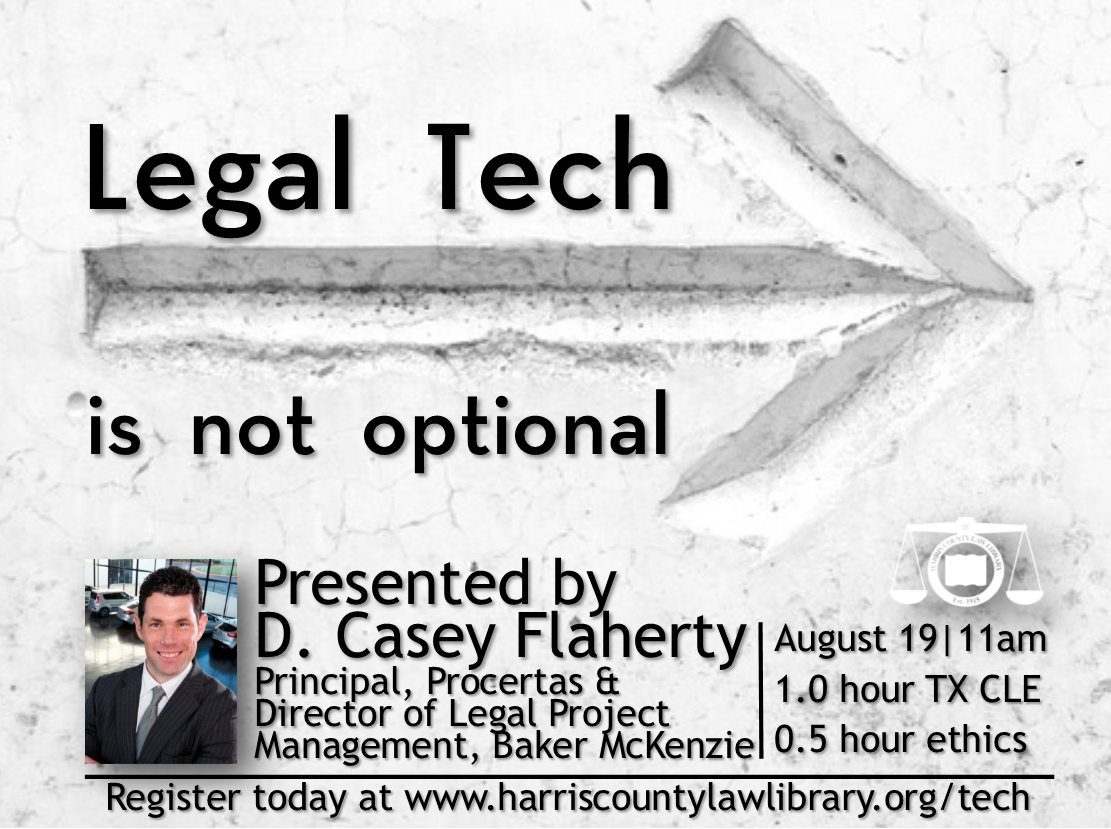
The Harris County Law Library’s Legal Tech Institute is pleased to announce a special visitor, D. Casey Flaherty, a recognized leader in legal tech innovation and the creator of the Procertas legal tech audit. Please join us on Monday, August 19 and 11:00 am for a CLE presentation called Legal Tech is not optional. Mr. Flaherty will share his insights about using technology in the practice of law and will highlight how the Procertas Legal Tech Assessment, which is available to all for free at the Harris County Law Library, can help attorneys work toward legal tech competence. Texas attorneys will earn one hour of CLE credit and .5 hours of ethics credit for attending. Join us!

In Events, Legal Tech Institute, Tech Tips, Tech Tuesday Tags Procertas, Legal Ethics, Legal Tech

Text-to-Speech Options

July 16, 2019 Heather Holmes

https://pixabay.com/vectors/speech-bubble-communication-speak-833379/

In order to better serve our visually impaired patrons, we at the Harris County Law Library recently explored our options for providing text-to-speech services. We were happy to discover three free tools: Otter, TTS Reader, and Microsoft Word. Each is described below.

Otter: Otter is more than just a text-to-speech application. Also included are a dictation feature and automatic, real-time transcription. The app and the basic plan, which offers 600 minutes of dictation per month, are free.

TTS Reader: Text To Speech Reader converts any text to spoken language. TTS will read your text in a natural voice. Choices include UK and US English in a male or female voice, in a range of reading speeds from Very Slow to Too Fast. Drag and drop files or paste content into the provided text box. TTS Reader will read aloud for you in whichever voice you select and at whichever speech you prefer.

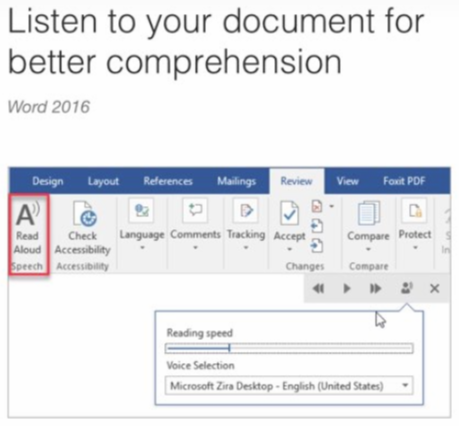
Microsoft Word: The newest versions of MS Office (2016, 2019, and Office 365) include a Read Aloud feature, allowing you to listen to your document for better comprehension. Words will be highlighted simultaneously as they are being read. To use this feature, simply open Word, click Review tab > Read Aloud, or press Alt+Ctrl+Space on your keyboard. Click Play/Pause to start and stop the narration. Select Settings to change the reading speed.

If you are using MS Office 2013, there is another option for accessing the text-to-speech conversion feature. Follow the steps outlined here (and see image below) to turn this feature on in Word 2013.

  • Open Word

  • Click the “Customize Quick Access Toolbar” button which is located at the very top of your window above the Tabs (File, Home, Insert, Design, Layout, etc.) Select “More Commands”

  • On the “Choose Commands From:” dropdown menu, select “Commands Not in the Ribbon”

  • Scroll down to the “Speak” option, then click Add. Click Add when you are finished.

  • Now, highlight the text to be read aloud. Click the Speak Button, which looks like a small speech bubble, on the Quick Access Toolbar. Word will read your text. It’s that easy!

In Tech Tuesday, Tech Tips Tags Legal Tech, Microsoft Word

The 2019 Solo and Small Firm Legal Technology Guide

July 9, 2019 Heather Holmes

By Sharon D. Nelson, John W. Simek, and Michael C. Maschke

Published by American Bar Association Law Practice Division (2019)

KF 320 .A9 N457 2019

Photo Credit: Helen Hartman

The American Bar Association’s annual guide to legal technology has arrived here at the Law Library. Newly updated, The 2019 Solo and Small Firm Legal Technology Guide is the guide to assist solo and small firm attorneys navigate the world of legal tech. The Guide offers information and recommendations to help attorneys find the technological equipment that will give them the most bang for their buck. From hardware to software to smartphones and anything else in between, the Guide takes the guesswork out of purchasing the computer equipment that is most appropriate for your office and business. Updated topics include:

  • new hardware and software recommendations;

  • best products to protect sensitive data;

  • tips for secure remote access to data;

  • suggestions to help you prepare for the unexpected and unthinkable, such as data breaches, lost smartphones, natural disasters; and

  • a roundup of tomorrow’s legal technology trends.

Intrigued? Come to the Harris County Law Library and ask for The 2019 Solo and Small Firm Legal Technology Guide at the reference desk. It can be found in our Legal Tech Collection.

In Featured Resources, Tech Tuesday Tags Legal Tech
← Newer Posts Older Posts →
 
Ex Libris Juris - HCLL Blog RSS

What’s behind the name? “Ex Libris Juris” is Latin for “from the books of law” and much of the information here will relate to the legal information collected and curated by the Law Library. Additionally, “Ex Libris” has long appeared on bookplates – labels appearing inside the front cover of books – and has acquired the connoted meaning “from the library of” to show ownership of the book. Using this connotation, the phrase becomes “from the library of law” and better describes the posts about digital resources, event announcements, and research tips that will regularly appear here.

You must select a collection to display.
Back to Top

Notice: Website Updates

Our website is currently undergoing updates to improve navigation, accessibility, and content. During this time, some pages may be temporarily relocated or revised. We appreciate your patience as we work to enhance your experience. If you need help locating a resource, please contact us through our Ask A Librarian form.

Harris County Robert W. Hainsworth Law Library, 1019 Congress Street, 1st Floor, Houston, Texas 77002

We are open Monday through Friday, 8 a.m. - 5 p.m.

The library is a division of the Office of the Harris County Attorney Jonathan G. C. Fombonne. The content of this Website is for informational purposes only. It is not a substitute for the advice of an attorney.

Site Map | Home | Law Library Rules & Policies | Subscribe to our Newsletter

Ask a Librarian